

A Way to Rename Multiple Files At Once
How to Rename a Bunch of Microsoft Word Docs
Wondering how to rename multiple files quickly and easily? Here's a way to give many files a new name without having to manually rename each file one at a time.
If you need to rename a bunch of Microsoft Word docs, or rename a bunch of files of any type, here's a quick and easy way to do it.
To give you background on why we are writing this article, you should know that we had written another article on how to merge all the Word docs in a folder into one Word doc.
That macro works fine but a lot of people have complained that is creates a new Word doc that sequences the merged Word docs in order by their alphabetical name.
So, A.doc was above B.doc was on top of C.doc, etc.
But what if you want the order of the docs in the merged file to be C.doc, B.doc, and then A.doc.
Our Merge Word Docs macro doesn't do the job for that scenario.
A brute force way to fix this is to rename the files. For example, in our example above, you might rename C.doc to be 1C.doc, B.doc to be 2B.doc, and C.doc to be 3C.doc.
After doing that, the Merge Word Documents macro would work just fine, right?
But if you've got 50 documents, say, it's a pain to rename all of them one by one.
There are probably a million ways to solve this problem, but here's one way. Be sure to read this entire article before you get started, including the very last note, which identifies a small flaw in this writeup that I didn't have time to address.
Put the names of the documents in a Microsoft Excel spreadsheet in a single column. The order of the documents should be in the order you want the documents to be merged.
So, maybe I have documents with the name A.doc, B.doc,...,M.doc but I want to merge these Word docs using the sequencing below:
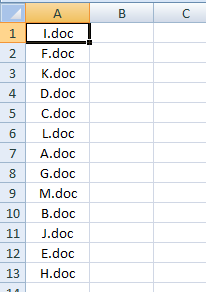
OK, so the first thing you do is put numbers in column B, so it looks like this picture.
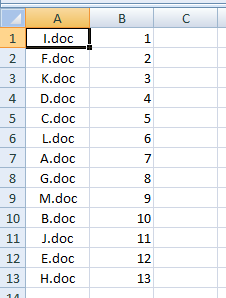
In other words, you start with 1 and increase by 1 going down. (Side note: A quick way to do it is to type 1 and 2 manually, and then select (highlight) the cells with the 1 and 2 in them. You'll see a small black square in the lower right corner of the two highlighted cells. Put your cursor on that black square and click and drag down. Excel will automatically increment the numbers for you.)
Now go to cell C1 and type this in:
="copy ..\"&A1&" "&B1&A1
Hit enter to complete the entry of this formula. Basically, what you've done is used Excel commands to create a DOS command. If this is new to you, it'll make more sense soon.
Select cell C1 and copy that cell down to all the cells below it that correspond to your document names in Column A. In our simple example, the spreadsheet now looks like this:
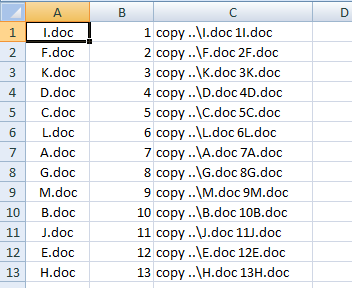
Now, select all of the cells that have the formula in it and then copy paste into a text file. I like to use Notepad to create a new text file. It comes with Windows and is usually in your Accessories folder off Program Files from the Start Menu.
Here's a quick pick of my new text file.
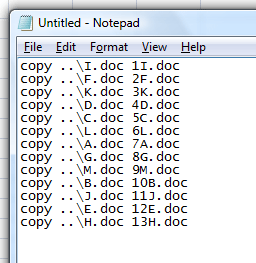
Now, you are going to save this text file as Rename.bat, but first read the instructions below very carefully.
When you do your File > Save As, make sure that you save this file in a new folder (i.e. a new directory) that is inside of the folder that contains all your Word docs that you want to merge. You can call that new folder whatever you want.
So, just to reiterate, you've now got a folder that contains all your Word docs and inside of that folder, along with all those Word docs, is a subfolder that contains this text file that is called Rename.bat (not rename.bat.txt, just rename.bat).
What you've done so far is to create a DOS batch file that has several instructions to go up one directory in the folder hierarchy and copy a Word doc to a Word doc with a different and new name.
To execute rename.bat, the DOS batch file, just drill down to the directory that contains rename.bat and double click on rename.bat.
The DOS commands will run and, within a short time, you will have all your renamed files in the folder that contains rename.bat. At this point, you can delete rename.bat, assuming it's done its job properly.
Now, you are in a good position to run the Merge All Word Documents in a Folder macro.
And, if you got to this page for an entirely different reason, you now know how to rename many documents. This works for all file types of course...not just for MS Word files.
IMPORTANT NOTE OK, I cranked this article out in no time and now I realize that the alpha sorting above would mess up a bit. That's because the alphabetic sequencing would be 10B.doc, 11J.doc, 12E.doc, 13H.doc, 1I.doc, 2F.doc, 3K.doc, 4D.doc, 5C.doc, etc. I don't have time to rewrite the article but the way you fix this is to put a zero in front of the single-digit numbers, so instead of renaming I.doc to 1I.doc, rename it to 01I.doc. Hopefully, you can figure that out on your own. Good luck!
Share this article
Additional Resources for Entrepreneurs

dir *.* /b >> files.txt
I save this file as a.bat and then I double click on it. It then produces a new text file that includes all the files in the directory. No need to retype anything. Good luck.